Preview
WindyVerse PC Gamer
Run Windows games on Android, with your Steam library and custom touch controls
What's New
Version History0.5.8 (23)2026-10-02
- What's new in 0.5.8
- Improvements
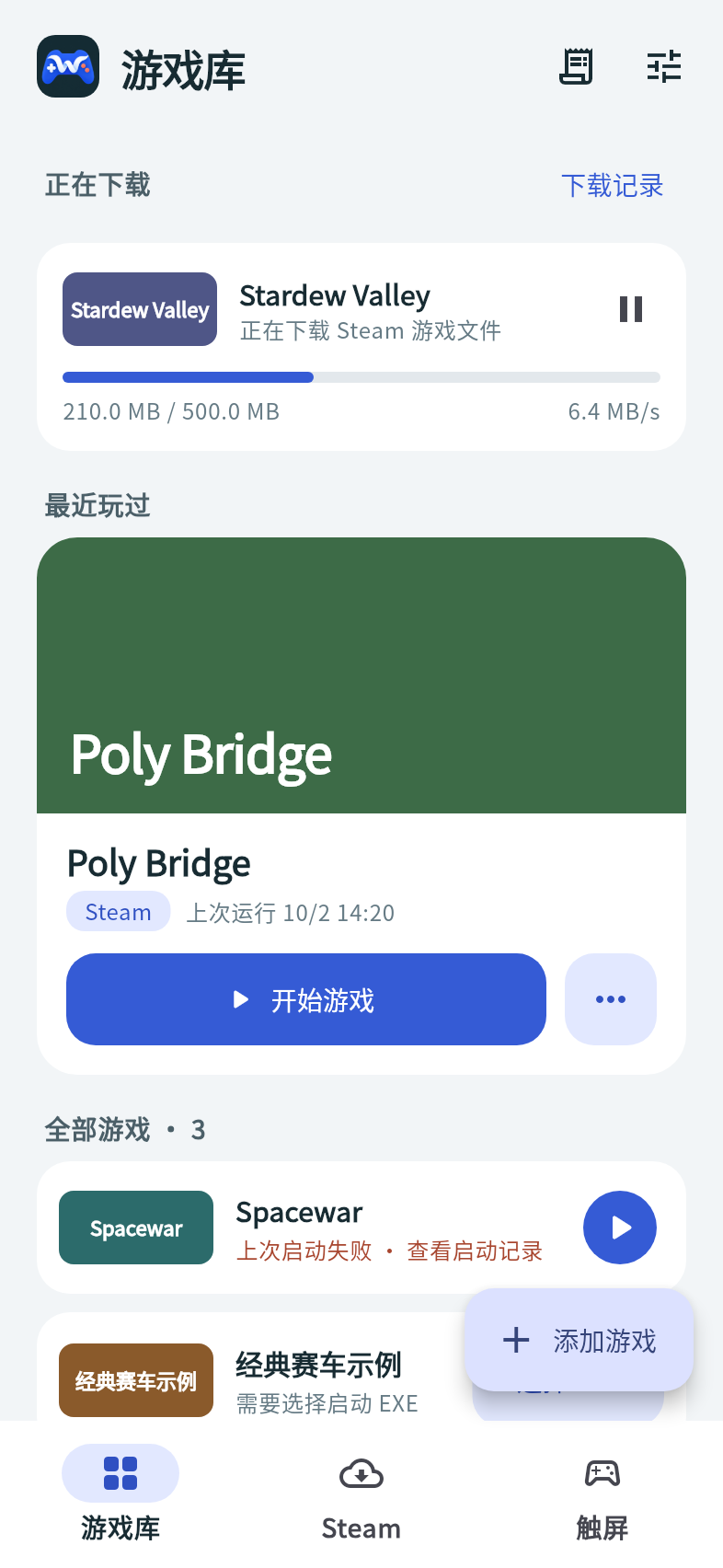
- - The bottom navigation now has Library, Steam and Controls. Downloads in progress appear at the top of the library.
- - The library highlights your most recently played game and shows how each game last ran. Steam games show their official cover art.
- - A new game page groups settings into Display, Compatibility, Steam, and Controls and troubleshooting. Changes save automatically.
- - Starting a game shows each launch step, including the Steam engine download on first use. If a launch fails, the app shows where it stopped, the error and what to do next.
- - The Steam page filters by All, Installed and Downloading, and lets you start or download games directly.
- - Download details show the percentage, network speed, time left and free storage.
- Fixes
- - Runtime requests no longer run on the main thread, which reduces stutter in the app.
- - Opening the app from Hub without the full PC Gamer app installed now shows the correct install prompt.
- Known limitations
- - Requires an Adreno GPU and a device with 4 KB memory pages.
- - OpenGL games, .NET games and physical controllers are not supported yet. Some games fail to start with WineD3D
- keep the default DXVK setting.
- - Steam covers load from Steam's image servers
- a placeholder appears when they cannot be reached.
- When reporting a problem, please include your device model, the game name and version, and its launch record.
About
Run Windows games on your Android device. WindyVerse PC Gamer runs games with ARM64EC Wine and FEX translation, and converts their graphics to Vulkan through DXVK and VKD3D-Proton, rendered by the Turnip driver. This is an internal preview.
• Game import: import Windows game ZIP archives or download them from a link, with pause and resume
• Steam library: authorize with a QR code, then browse and download the Windows games your account owns; games start after the genuine Steam engine verifies the account
• Touch controls: racing, WASD and arrow-key presets, or custom buttons and sticks with adjustable position, size and opacity, saved per game
• Per-game settings: resolution, graphics API (DXVK or WineD3D), CPU translation accuracy and frame rate limit
• Chinese text: Chinese font fallback is configured before each launch
• Launch records: the stages and logs of every launch, ready to copy or export for troubleshooting
Requirements: an ARM64 device with Android 8.0 or later, an Adreno GPU and 4 KB memory pages. OpenGL games, .NET games and physical controllers are not supported yet. The first launch extracts the runtime and creates a Wine environment, which takes a few minutes.
Compatibility varies by game and device, and this preview has not been tested with most games and devices. The app includes no games; use only game files you have the right to use. Steam authorization is encrypted on the device with Android Keystore. Steam is a trademark of Valve Corporation. This app is not affiliated with Valve.
Version History
- 0.5.8 (23)2026-10-02Download this version
- What's new in 0.5.8
- Improvements
- - The bottom navigation now has Library, Steam and Controls. Downloads in progress appear at the top of the library.
- - The library highlights your most recently played game and shows how each game last ran. Steam games show their official cover art.
- - A new game page groups settings into Display, Compatibility, Steam, and Controls and troubleshooting. Changes save automatically.
- - Starting a game shows each launch step, including the Steam engine download on first use. If a launch fails, the app shows where it stopped, the error and what to do next.
- - The Steam page filters by All, Installed and Downloading, and lets you start or download games directly.
- - Download details show the percentage, network speed, time left and free storage.
- Fixes
- - Runtime requests no longer run on the main thread, which reduces stutter in the app.
- - Opening the app from Hub without the full PC Gamer app installed now shows the correct install prompt.
- Known limitations
- - Requires an Adreno GPU and a device with 4 KB memory pages.
- - OpenGL games, .NET games and physical controllers are not supported yet. Some games fail to start with WineD3D
- keep the default DXVK setting.
- - Steam covers load from Steam's image servers
- a placeholder appears when they cannot be reached.
- When reporting a problem, please include your device model, the game name and version, and its launch record.
- 0.5.7 (22)2026-10-02Download this version
- What's new in 0.5.7
- Fixes
- - Background Steam now recognizes downloaded games and starts them.
Ratings & Reviews
Reviews launch in v1.5 · ★ score / text / helpful votes